

Global Marketplace APIs
Walmart Marketplace Global APIs provide a unified integration framework for sellers and approved Solution Providers operating in Canada, Mexico, and Chile. With a consistent API experience across these markets, you can simplify implementation, reduce maintenance, and expand more efficiently.
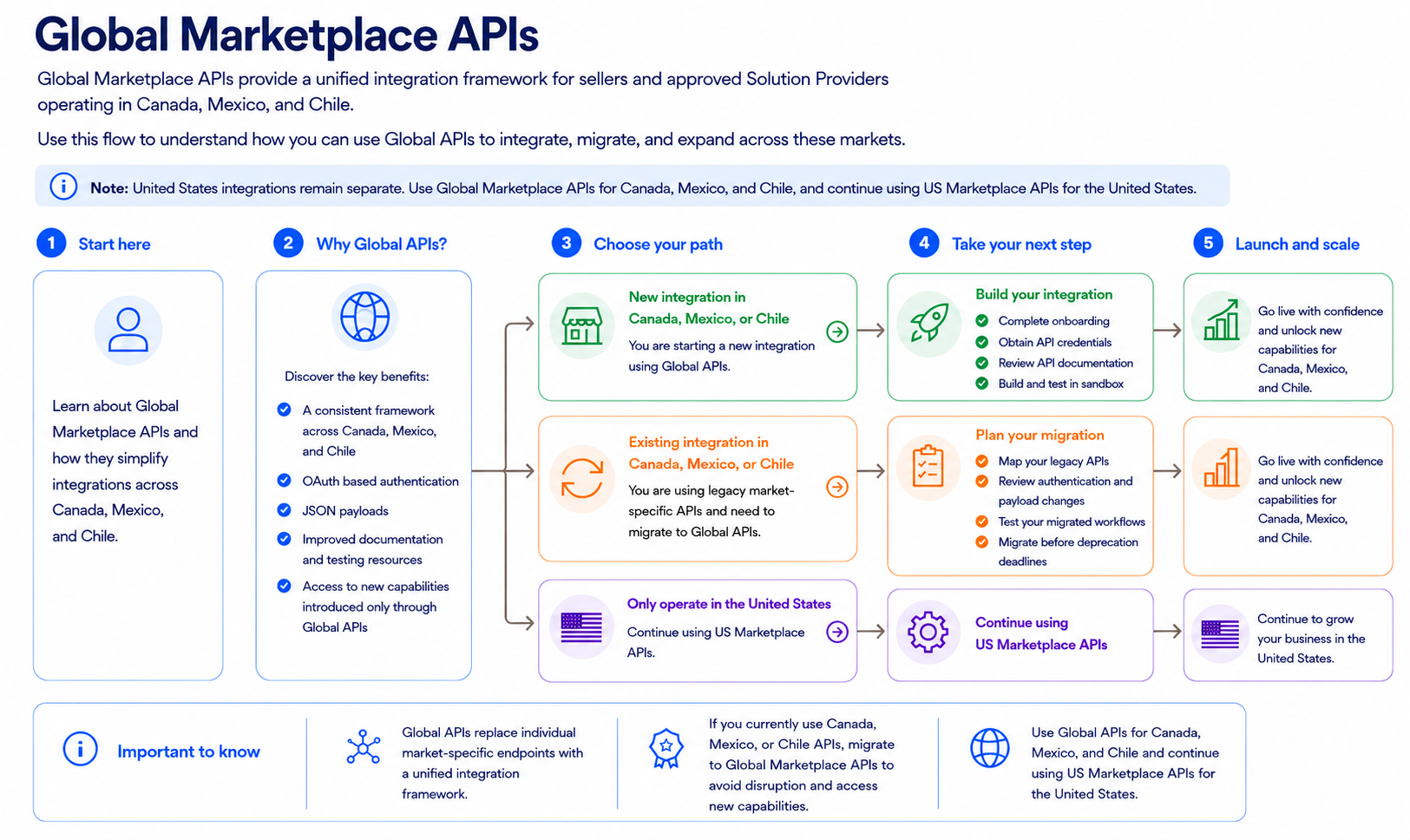
Why use Global Marketplace APIs?
Global APIs provide a consistent framework across Canada, Mexico, and Chile and reduce the need to maintain separate market-specific integrations.
Key benefits include:
- Access to new capabilities introduced through Global APIs
- A consistent API experience across supported markets
- OAuth based authentication
- JSON request and response payloads
- Shared documentation and testing resources
- Sandbox support for validating workflows
Choose your integration path
New sellers and approved Solution Providers should begin directly with Global APIs. Existing users of legacy Canada, Mexico, and Chile APIs must migrate to avoid disruption and access new capabilities coming to their market.
Start a new integration
Use this path if you are building a new integration for Canada, Mexico, or Chile.
New sellers and approved Solution Providers should start directly with Global Marketplace APIs.
- Complete the applicable seller or approved Solution Provider onboarding requirements for the markets you plan to support.
- Obtain your Global API credentials.
- Sellers: Generate your API keys in the Developer Portal. For instructions, refer to Direct API integration.
- Approved Solution Providers: Work with each seller to obtain API credentials through delegated access. For instructions, refer to Delegated access authorization.
- Review the API documentation and confirm market availability for each workflow you plan to support.
- Build and test your workflows in sandbox.
- Validate your integration before production.
Migrate an existing integration
Use this path if you currently use legacy Canada, Mexico, or Chile APIs.
Existing users must migrate their supported workflows to Global Marketplace APIs to avoid disruption and access new capabilities introduced through the Global API experience.
- Identify the legacy APIs and workflows you currently use.
- Use the Market-specific to Global API mapping guide to identify the corresponding Global APIs.
- Review endpoint, authentication, and payload changes.
- Update your integration.
- Test migrated workflows in sandbox.
- Complete migration before legacy APIs are retired.
Continue with US Marketplace APIs
Use this path if your integration supports only the United States.
No Global API migration is required. Continue using US Marketplace APIs and the applicable US onboarding, authentication, and integration guidance.
If you operate in both the United States and Global Marketplace markets:
- Use Global Marketplace APIs for Canada, Mexico, and Chile.
- Continue using US Marketplace APIs for the United States.
What changes with Global APIs?
Authentication
Global Marketplace APIs use OAuth based authentication.
- Sellers use the
client_credentialsgrant type. - Approved Solution Providers use the
client_credentialsgrant type with delegated access after seller authorization. - Canada legacy APIs use certificate-based authentication, which is being replaced by OAuth based authentication.
- Mexico and Chile legacy APIs already use OAuth based authentication.
Request and response format
Global APIs use JSON request and response payloads instead of XML.
When migrating, review each mapped endpoint for changes to fields, schemas, headers, errors, pagination, and workflow behavior.
Market availability
Not every API or operation is available in every market. Review the market availability information in the Global API reference to confirm whether a capability is supported in Canada, Mexico, Chile, or the United States.
If market availability is listed as Global, the API is available in the United States, Canada, Mexico, and Chile. If an API is not available in all four markets, the supported markets are listed individually.
Test your integration
Use sandbox to validate new and migrated workflows before moving to production.
You can use sandbox testing to:
- Validate requests and responses
- Confirm authentication and credential handling
- Test business validations and error handling
- Verify end-to-end workflows
- Identify market-specific behavior
Resources
Use these resources to start a new Global Marketplace API integration,
migrate existing workflows, and prepare your integration for production.
Migration resources
Migration resources


Getting started resources
Getting started resources


Updated 2 months ago