
Campaign and ad group lifecycle
Understand campaign and ad group lifecycle states, interactions, and launch requirements.
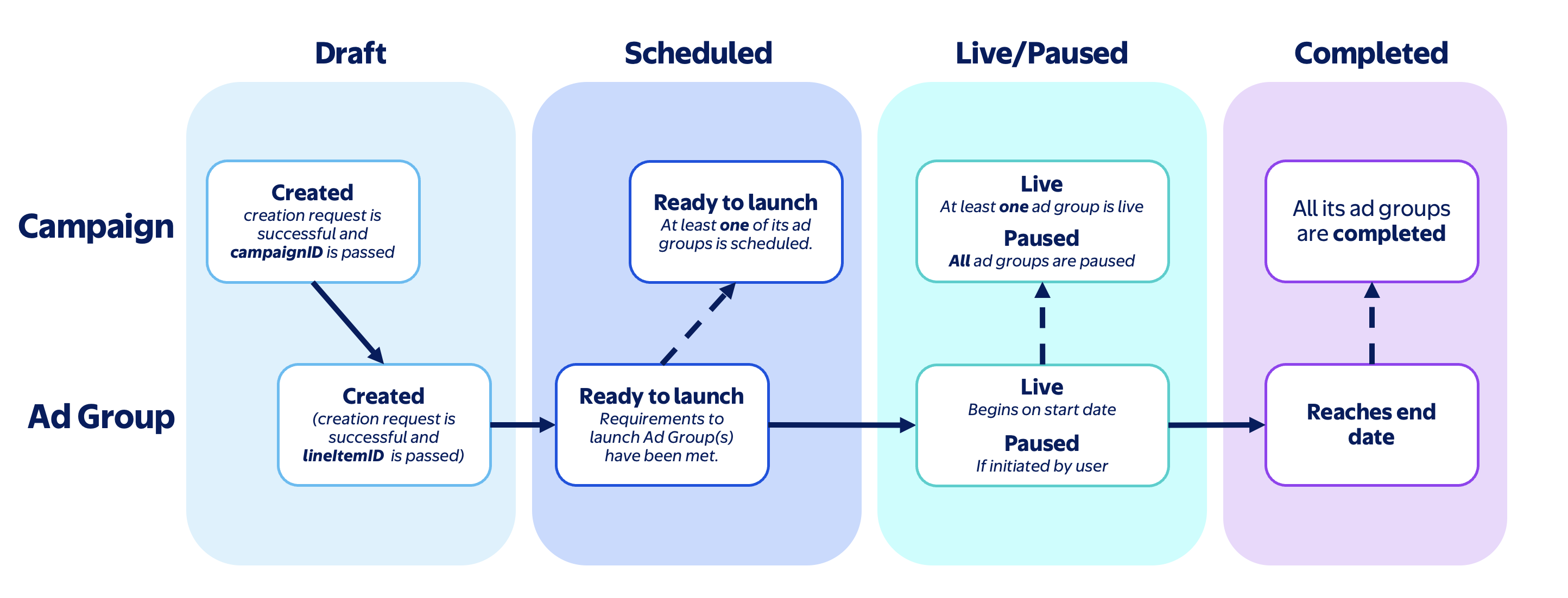
Campaign and ad group status sequence
Campaigns and ad groups move through a shared lifecycle, but the readiness rules are different for each object type. Use this view to understand what each status means at a glance.
Campaign lifecycle
Campaigns move from draft to scheduled, then into live delivery, pause, and completion.
Ad group lifecycle
Ad groups also move from draft to scheduled, but can become live independently of the parent campaign as long as launch requirements are met.
Campaign and ad group status interactions
The below details how ad group and campaign status workflows interact with each other.
What has to be ready before an ad can serve
Use this view to understand which configuration belongs at the campaign level, which belongs at the ad group level, and what must be in place before an ad group can go live.
Campaign-level configuration
Campaigns provide the top-level structure for delivery. They define the objective, inventory type, and optional budget and scheduling framework used by downstream ad groups.
Ad-group-level launch requirements
Ad groups contain the targeting, bidding, and creative configuration that ultimately determines whether ads can serve.
Set the top-level campaign structure and the configuration that should remain anchored at the campaign level.
Complete the bid, targeting, schedule, and creative association that make the ad group eligible to serve.
Status quick reference
| Status | Meaning | Next action |
|---|---|---|
| Draft | Object exists but is not ready to serve | Complete required configuration |
| Scheduled | Launch requirements are satisfied | Wait for start date or activate |
| Live | Currently serving | Monitor delivery and performance |
| Paused | Delivery is intentionally stopped | Resume delivery when ready |
| Completed | End date has passed | Create a new campaign or ad group if additional delivery is needed |
Updated about 12 hours ago