
Automotive fitment
Manage your auto fitment on Walmart Marketplace
A fitment file is a document used in the automotive industry to help retailers, manufacturers, and consumers determine if a specific part works for a particular vehicle. The primary purpose of a fitment file is to ensure that auto parts, accessories, or components such as tires, wheels, or performance parts are compatible with the specific vehicles listed. Fitment data typically includes information on:
- Year: The production year of the vehicle.
- Make: The manufacturer of the vehicle (e.g., Toyota, Ford).
- Model: The specific model of the vehicle (e.g., Camry, F-150).
- Sub models: Variations or trims of the vehicle model (e.g., LE, XLE).
- Engine: Details about the engine type or configuration (e.g., 2.5L, V6).
Direct fit items (also called direct fit interchanges) are replacement auto parts that match the original equipment manufacturer (OEM) parts exactly. They require no modifications, making them easy to swap out and ensuring proper fit and performance, just like the original parts.
Fitment files enable retailers and manufacturers to determine which parts are a "direct fit" for specific vehicles. This is achieved through standards such as the Aftermarket Catalog Exchange Standard (ACES) and the Product Information Exchange Standard (PIES).
- ACES focuses on fitment data to ensure that parts are compatible with specific vehicles.
- PIES provides detailed product information, including descriptions, pricing, and branding.
Resources to create a fitment file
Refer to the Acceptable Year, Make, Model, Sub models (YMMS) information in the Vehicle List.
Use the provided Vehicle List to create your YMMS and engine base data records. If your YMMS inputs include vehicles not in the linked vehicle list OR the YMMS inputs do not match the YMMS in the vehicle list exactly, the row will error out, and fitment will fail. Ensure your YMMS inputs match the acceptable values in the linked Vehicle List.
Uploading fitment files
Existing direct fit items can be updated with fitment data using the Bulk Item Update API for FITMENT_ACES and FITMENT_PIES feed types.
Both ACES and PIES file types should be uploaded in .zip format. ACES zip files can contain either .xml or .xlsx files, while PIES zip files can only contain .xml files. The zip files must contain only one file type and one brand at a time and should not exceed 50 MB. In the following sections, there are specific rules per file type.
ACES XML file update requirements
Follow these guidelines to ensure your ACES XML files are correctly formatted, processed, and compliant with the requirements.
- The BrandAAIAID must be present in the header row of the file.
- The BrandAAIAID must be included in the BrandAAIAID tag within the first 1,000 characters of the file (for example, (Brand ID)).
- The BaseVehicleID, PartNumber, and PartTerminologyId values must be provided.
- To add a new vehicle, the Action column should be set to
Add(A). - To delete an existing vehicle, the Action column should be set to
Delete(D). - If an Action value is missing for an XML app node, it will default to
Add(A). - If the SubModel/EngineBase value is empty, it will default to
Allindicating that the product fits all types.
ACES XLSX file update requirements
Rules related to header format:
- The Excel file should use the following header format:
| MPN/SKU | Action (A or D) | GTIN | Part Terminology Id | Part Terminology Name | BrandAAIAD | Year(YYYY)/ Year Range (YYYY-YYYY) | Make | Model | SubModel | BlockType | Cylinders | Liter | CC | Note |
|---|---|---|---|---|---|---|---|---|---|---|---|---|---|---|
- The header format should maintain the same order and names of columns as specified above.
- Adding or deleting columns in any Excel file within the zip is not allowed.
Rules related to BrandAAIAD:
- Each Excel file should contain only one unique BrandAAIAID. The first occurrence of a non-empty BrandAAIAID in the Excel file will be considered. Multiple BrandAAIAIDs within a single Excel file are not allowed.
- In a zip file, no two Excel files should contain the same BrandAAIAID.
- If there are multiple Excel files with the same BrandAAIAID, you have two options:
- Merge them into a single Excel file, ensuring the combined file does not exceed the 50 MB zip file size limit.
- Zip each file separately and upload them to Seller Center or Partner API to ensure multiple Excel files with the same BrandAAIAID are not in a single zip file (recommended).
- Rows with empty MPN/SKU or Part Terminology Id will not be ingested.
- If the Action column value is missing for a row, it will be considered as ‘Add’ (A) by default.
- The Year (YYYY) or Year Range (YYYY-YYYY) column value should be either a single year value or a single year range (for example, 2007 or 2007-2019). Rows containing values that do not adhere to this format will not be ingested.
- If the SubModel column is empty, its value will be ingested as ALL (meaning it fits all) by default.
- If BlockType, Cylinders, Liter, and CC columns are empty, their value will be ingested as ALL (meaning it fits all) by default.
- Data for the following part types will not be ingested via the ACES format: Tires (7636), Engine Oil (12138), Differential Oil (12137), Automatic Transmission Fluid (11387), Manual Transmission Fluid (13630), Brake Fluid (11389), Power Steering Fluid (11395), Gear Oil (11394), Coolants (11393), and Refrigerants (6984).
- Each Excel file should contain only one sheet.
- Excel cell/column values should contain plain text and not any mathematical expressions or formulas.
For example, cells that display text but contain expressions upon clicking.
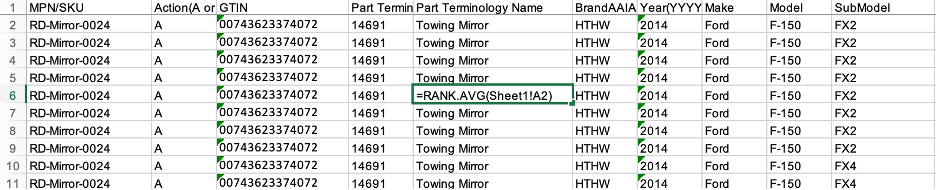
- Each cell in the Excel file should contain only a single line of text. Text within a cell cannot be wrapped or split into multiple lines. If a cell contains multiple lines, separated by newline breaks or characters, you'll get a Newline character in a cell error message.
For example, the text Towing Mirror should be on the same line as shown in the Valid column and not separated by a newline character as shown in the Invalid columns. Refer to the screenshot below.

PIES file update requirements
To process updates correctly in the PIES files, the following conditions must be met.
- The ItemLevelGTIN, BrandAAIAID, PartNumber, and PartTerminologyID values must be provided.
- Items will be updated only if there is a change in attribute values corresponding to a particular GTIN and the MaintenanceType value is
Add(A) orChange(C).
Feed processing and error handling
If any of the above rules are not followed, the file will not be processed and will result in an error. The zip file will be rejected and its status marked as failed. Additionally, after uploading your files, an attribute status may not reflect the update based on the content ranking source.
After the feed has been processed, use the Feed Item Status API to check its status. In case of errors, use the Get feed error report API to download the error report.
Sample files
Refer to the example ACES and PIES .zip files.
Updated 9 months ago