

On Request Reports API overview
Overview
Use the On Request Reports API to create, track, and download on-demand reports. You choose a report type, version, and optional filters. The service generates the report asynchronously, then returns a time-limited download URL when ready.
What you can do
- Create a report request with optional row-level filters and column selection.
- List your recent report requests from the last 30 days.
- Check the status of a single report request.
- Get a signed URL to download the finished report.
Audience: Suppliers and DSVs who need on-demand reports for orders, inventory, items, product content, and pricing.
Base URLs:
https://api-gateway.walmart.comhttps://sandbox.walmartapis.com
Reports take 15 to 45 minutes to generate and are available for download after they are generated.
Requested reports are retained for 30 days. Request a report for up to 30 days with the requestId for the report. There is no need to request a new one each time.
Request one report for each report type per hour. Although users can request multiple report types at the same time, they can make a request for each report type only once per hour.
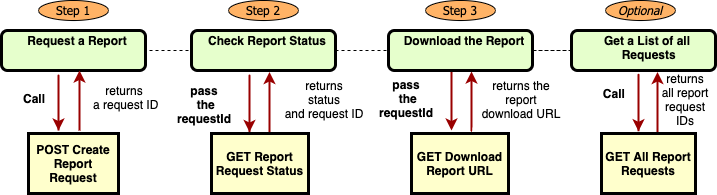
The following diagram details the report request workflow.
Authentication & headers
Use the Authentication Management API to obtain WM_SEC.ACCESS_TOKEN. Send the token in the header for each call. Refresh when tokens expire.
Send a unique WM_QOS.CORRELATION_ID (GUID) with each request to help support teams trace calls.
Common headers
| Header | Required | Notes |
|---|---|---|
WM_SEC.ACCESS_TOKEN | Yes | OAuth 2.0 bearer token |
WM_QOS.CORRELATION_ID | Yes | GUID you generate per call |
WM_CONSUMER.CHANNEL.TYPE | No | Provided during onboarding |
Accept | No | Use application/json |
Content-Type | As needed | application/json for bodies |
Report types & versions
Specify a reportType and reportVersion when creating or listing requests.
| Report type | Use case | Version(s) |
|---|---|---|
DSV_ORDERS | DSV orders in a time window | v1 |
INVENTORY_DSV | DSV inventory snapshot | v1 |
INVOICES | Invoices and payment details | v1 |
ITEM_CONFIGURATION_DATA | Item configuration data | v1 |
PRODUCT_CONTENT_DATA | Items you sell to Walmart | v1 |
VENDOR_MANAGED_PRICING | Item-store cost and price data | v1 |
How it works
- Create a report request with
reportTypeandreportVersion. - Poll the request using either:
- List all report requests to filter by type, status, or date, or
- Get a single request by
requestId.
- When status is
READY, download using the download URL endpoint.
Pagination
List operations return a nextCursor when more data is available. Pass the returned cursor in the next request to continue. If both page and limit and cursor are present, use the cursor.
Status model
| Field | Values |
|---|---|
requestStatus | RECEIVED, INPROGRESS, READY, ERROR |
Endpoints
Create report request
POST /v3/reports/reportRequests
Create a new report request with optional rowFilters and includeColumns.
Query parameters
reportType(string, required): One of the types in the table above.reportVersion(string, required): Supported version for the report type.
Headers
WM_SEC.ACCESS_TOKEN(required)WM_QOS.CORRELATION_ID(required)Accept: application/jsonContent-Type: application/json
Request body
{ "rowFilters": [ { "type": "enumFilter", "columnName": "SUPPLY ITEM STATUS CODE", "values": ["Active","Deleted"] }, { "type": "rangeFilter", "columnName": "Unit Cost", "from": "5.00", "to": "10.00" } ], "includeColumns": ["Invoice Date","Invoice Status","Total Invoice Amount"]
}
Response 200 (example)
{ "requestId": "4406b7c3-674e-41e4-a18a-5fd6f123479f", "requestStatus": "RECEIVED", "requestSubmissionDate": "2025-11-28T13:34:54Z", "reportType": "INVENTORY_DSV", "reportVersion": "v1"
}
cURL
curl -X POST "https://api-gateway.walmart.com/v3/reports/reportRequests?reportType=INVENTORY_DSV&reportVersion=v1" \ -H "WM_SEC.ACCESS_TOKEN: <ACCESS_TOKEN>" \ -H "WM_QOS.CORRELATION_ID: <GUID>" \ -H "Content-Type: application/json" \ -d '{ "rowFilters":[{"type":"enumFilter","columnName":"SUPPLY ITEM STATUS CODE","values":["Active"]}] }'Retrieve all report requests
GET /v3/reports/reportRequests
Returns report requests from the last 30 days. Use query params to filter.
Query parameters
reportType(string, optional)reportVersion(string, required)requestStatus(string, optional):RECEIVED,INPROGRESS,READY,ERRORrequestSubmissionStartDate(string, optional, ISO 8601)requestSubmissionEndDate(string, optional, ISO 8601)
Headers
WM_SEC.ACCESS_TOKEN(required)WM_QOS.CORRELATION_ID(required)Accept: application/json
Response 200 (example)
{ "page": 1, "totalCount": 19, "limit": 10, "nextCursor": "reportType=INVENTORY_DSV&page=2&limit=10", "requests": [ { "requestId": "4406b7c3-674e-41e4-a18a-5fd6f123479f", "requestStatus": "RECEIVED", "requestSubmissionDate": "2025-11-28T13:34:54Z", "reportType": "VENDOR_MANAGED_PRICING", "reportVersion": "v1", "reportSummary": "Report summary", "reportGenerationDate": "2025-11-28T13:41:35Z" } ]
}
cURL
curl -G "https://api-gateway.walmart.com/v3/reports/reportRequests" \ -H "WM_SEC.ACCESS_TOKEN: <ACCESS_TOKEN>" \ -H "WM_QOS.CORRELATION_ID: <GUID>" \ --data-urlencode "reportVersion=v1" \ --data-urlencode "reportType=INVENTORY_DSV"Retrieve details on a single report
GET /v3/reports/reportRequests/{requestId}
Check the status and metadata for a specific request from the last 30 days.
Path parameter
requestId(uuid, required)
Headers
WM_SEC.ACCESS_TOKEN(required)WM_QOS.CORRELATION_ID(required)Accept: application/json
Response 200 (example)
{ "requestId": "4406b7c3-674e-41e4-a18a-5fd6f123479f", "requestStatus": "READY", "requestSubmissionDate": "2025-11-28T13:34:54Z", "reportType": "INVENTORY_DSV", "reportVersion": "v1", "reportSummary": "Report summary", "reportGenerationDate": "2025-11-28T13:41:35Z"
}
cURL
curl "https://api-gateway.walmart.com/v3/reports/reportRequests/4406b7c3-674e-41e4-a18a-5fd6f123479f" \ -H "WM_SEC.ACCESS_TOKEN: <ACCESS_TOKEN>" \ -H "WM_QOS.CORRELATION_ID: <GUID>"Download report URL
GET /v3/reports/downloadReport
Return the signed URL to download the report when requestStatus=READY.
Query parameters
requestId(uuid, required)
Headers
WM_SEC.ACCESS_TOKEN(required)WM_QOS.CORRELATION_ID(required)Accept: application/json
Response 200 (example)
{ "requestId": "2ae33c9d-fdf7-40e3-1230-9a73fec09adb", "requestStatus": "READY", "requestSubmissionDate": "2025-11-24T04:09:48Z", "reportType": "INVENTORY_DSV", "reportVersion": "v1", "reportGenerationDate": "2025-11-24T04:11:31Z", "downloadURL": "https://marketplace.walmartapis.com/v3/reports/getReport/inventory-dsv-report/InventoryDSVReport_721555_2025-11-241230948.277000.zip?...", "downloadURLExpirationTime": "2025-11-28T11:13:49Z"
}
cURL
curl -G "https://api-gateway.walmart.com/v3/reports/downloadReport" \ -H "WM_SEC.ACCESS_TOKEN: <ACCESS_TOKEN>" \ -H "WM_QOS.CORRELATION_ID: <GUID>" \ --data-urlencode "requestId=<REQUEST_ID>"The
downloadURLis time-limited. Download the file beforedownloadURLExpirationTime.
You can refine reports with row filters and optionally limit output columns using includeColumns.
- Row filters
enumFilter: match exact values withvaluesrangeFilter: specify numeric or date ranges withfromandto
- includeColumns: supply a list of column names to return
Example body with both
{ "rowFilters": [ {"type":"enumFilter","columnName":"SUPPLY ITEM STATUS CODE","values":["Active"]}, {"type":"rangeFilter","columnName":"Unit Cost","from":"5.00","to":"10.00"} ], "includeColumns": ["Season Year","Season Code","Shipping Dimensions"]
}
Error handling
- Errors are returned with standard HTTP codes. For report requests, track
requestStatus. - If a request reaches
ERROR, adjust filters or inputs and submit a new request.
Support tips
- Always send a fresh GUID in
WM_QOS.CORRELATION_ID. - Keep
requestIdfor tracking and support. - Prefer
nextCursorwhen present.
Troubleshooting and Error Codes
Here are some hints for how to solve these possible errors in the event of failures.
Notice there are several reasons why users might get an INVALID_REQUEST_PARAM error. These reasons depend on which API the users call and which parameters are required for that API.
| Error Code | Description |
|---|---|
| SYSTEM_ERROR | There is an error in the system. Please wait and try again later. |
| INVALID_REQUEST_PARAM | A required query parameter is missing. Make sure the user specified all required parameters. (e.g. reportType, requestId) |
| INVALID_REQUEST_PARAM | If the submission start date is beyond 30 days of the report expiration time, the user will get an error. |
| INVALID_REQUEST_PARAM | The request is possibly missing the start and end dates in the Retrieve all report requests request (GET /v3/reports/reportRequests). Try again with both dates provided. |
| INVALID_REQUEST_PARAM | The date specified might not be in correct date format. |
| MISSING_REQUEST_HEADER | The header is missing content. Make sure all required header parameters (e.g. channelType) are specified in the API call. |
| MISSING_REQUEST_PARAM | Make sure to specify the required request parameter; for example, reportType. |
| CONTENT_NOT_FOUND | The requestId could not be found. Try again with correct request ID. |
Updated 11 days ago