

Notifications overview
Notifications, also known as webhooks, are mechanisms for Walmart to use POST API requests to send messages, which are also known as event notification payloads, to suppliers. These messages are sent when a defined event occurs at a defined location, such as the destination URL, that a supplier specifies. Notifications are not meant to replace GET API requests from suppliers, but are meant to improve our suppliers’ API integrations.
Notifications help suppliers:
- Optimize integration
- Automate workflows
- Reduce the number of times the app must poll Walmart APIs (within the throttle limits) to determine if an event has occurred
The following diagram shows the process of using APIs without webhooks:
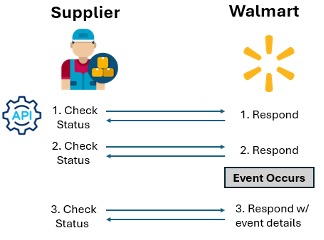
The following diagram shows the process of using APIs with webhhooks:

Note the following about Notifications:
- The process and APIs used to subscribe to and manage notifications are the same for all events at Walmart.
- The webhook and event notification payload that Walmart sends will be unique for each event that Walmart sends.
- Note: For specified events where different outcomes are possible, the notification payload may vary by event outcome.
- Subscribe to events with different authentication frameworks. Walmart can send notifications through Basic, HMAC, and OAuth.
- When an event occurs, Walmart expects to receive a 200 response back from the supplier’s request. If the supplier service does not return a 200 response, Walmart will retry sending the event two more times (equaling three times total).
- Events are not meant to replace API integration flows. Continue to use read requests to get all details, as events are meant to be lightweight and only maintain minimal information.
Walmart is working to build out the events available for subscription. If there are additional events that would increase supplier efficiency in working with Walmart, let your Walmart points of contact know.
Overview
Use the Notifications Management API to discover available event types, subscribe your webhook endpoints, update or delete subscriptions, and send test notifications to validate your configuration. Walmart sends notifications when specific events occur (for example, a bulk feed finishes processing or a report becomes ready to download). This guide maps to the following resources:
GET /v3/webhooks/eventTypes— list event types you can subscribe toPOST /v3/webhooks/subscriptions— create one or more subscriptionsGET /v3/webhooks/all/subscriptions— list your subscriptions with filtersPATCH /v3/webhooks/subscriptions/{subscriptionId}— update a subscriptionDELETE /v3/webhooks/delete/subscriptions/{subscriptionId}— delete a subscriptionPOST /v3/webhooks/test— send a test notification to your endpoint
Walmart sends webhook payloads for these event types (payload shape documented here so you can build receivers):
FEED_STATUS— notifications about feed processing resultsREPORT_STATUS_SUPPLIER— notifications when a requested report is ready or fails
Audience: Suppliers and DSVs who want to receive webhook notifications
Base URLs:
- Production:
https://api-gateway.walmart.com - Sandbox:
https://sandbox.walmartapis.com
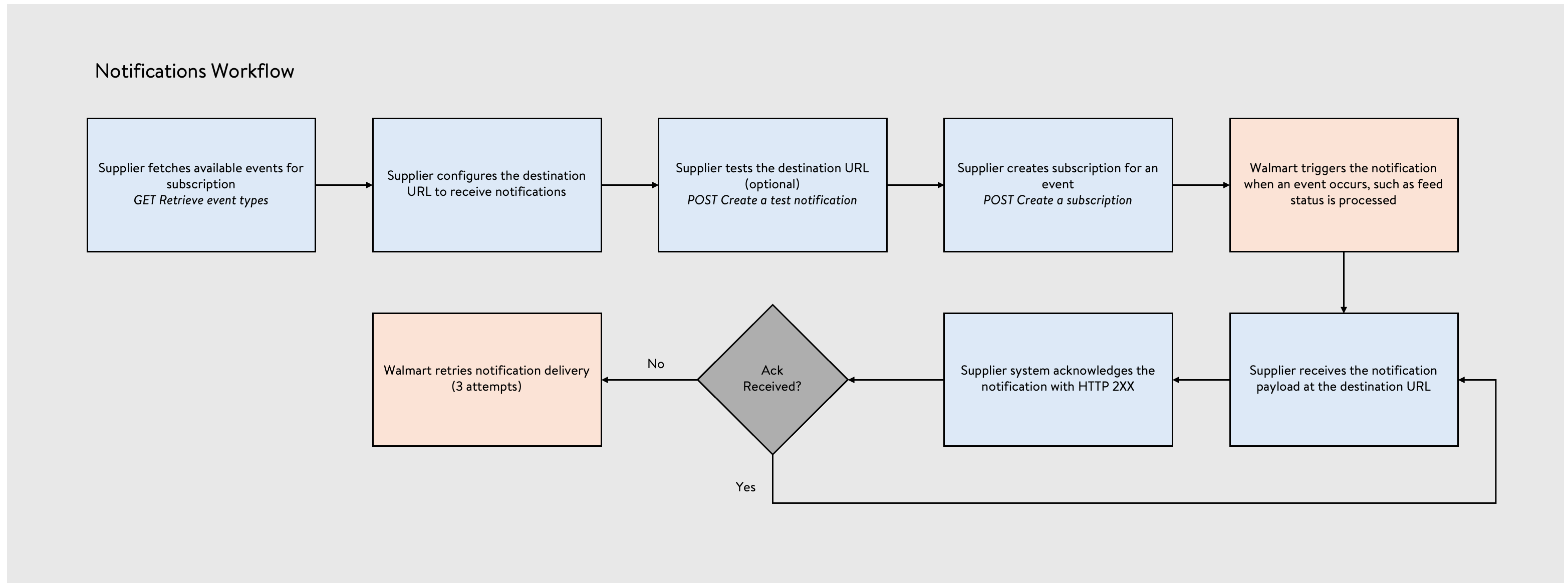
The following diagram visualizes the notifications workflow:
What you can do
- View what events are available for notification
- Manage your subscription for those events (create subscription, view subscriptions, and update/delete subscription)
- Test subscriptions and integrations
Before you begin
- Authentication: All management endpoints require an OAuth access token. Use the Authentication API to obtain a token, then pass it in
WM_SEC.ACCESS_TOKEN. - Event URL: Host a public HTTPS endpoint to receive notifications. Support your chosen auth method (Basic, OAuth, or HMAC), and be able to parse JSON payloads. Validate the URL using the POST
/v3/webhooks/testrequest. - Correlation ID: Generate a unique
WM_QOS.CORRELATION_ID(GUID) per request for tracing.
Authentication & headers
Use the Authentication Management API to obtain WM_SEC.ACCESS_TOKEN. Send the token in the header for each call. Refresh when tokens expire.
| Header | Required | Description |
|---|---|---|
WM_SEC.ACCESS_TOKEN | Yes | OAuth access token for token-based authentication. |
WM_QOS.CORRELATION_ID | Yes | GUID you generate per call for tracing and support. |
WM_CONSUMER.CHANNEL.TYPE | No | Channel identifier received during onboarding. |
Accept | No | Use application/json unless you need XML. |
Authentication for your webhook endpoint
When Walmart calls your eventUrl, it can authenticate in one of three ways. Configure your subscription accordingly:
- BASIC_AUTH — Walmart sends an auth header named by
authHeaderName(for example,Authorization) with valueBasic <base64(username:password)>. - HMAC — Walmart sends an auth header named by
authHeaderNamewhose value is an HMAC SHA-256 signature over the full request body usingclientSecret. Verify the signature before processing. - OAUTH — Walmart obtains a token from your
authUrlusing the client credentials grant (grant_type=client_credentials) and then calls your eventUrl, passing the token in the header named byauthHeaderName(value usuallyBearer <token>). Custom headers defined inheadersare also included.
Endpoint summary
| Method | Path | Purpose |
|---|---|---|
| GET | /v3/webhooks/eventTypes | List event types and resources you can subscribe to. |
| POST | /v3/webhooks/subscriptions | Create one or more subscriptions to events. |
| GET | /v3/webhooks/all/subscriptions | List subscriptions; filter by subscriptionId, resourceName, and status. |
| PATCH | /v3/webhooks/subscriptions/{subscriptionId} | Update endpoint URL, auth, headers, status, and more. |
| DELETE | /v3/webhooks/delete/subscriptions/{subscriptionId} | Delete a subscription. |
| POST | /v3/webhooks/test | Send a test payload to your endpoint URL. |
Retrieve event types
GET /v3/webhooks/eventTypes
/v3/webhooks/eventTypesReturns the event types, versions, and resource names you can subscribe to.
Sample request
curl -X GET 'https://api-gateway.walmart.com/v3/webhooks/eventTypes' -H 'WM_SEC.ACCESS_TOKEN: <YOUR_ACCESS_TOKEN>' -H 'WM_QOS.CORRELATION_ID: 43f42ce0-8444-4377-acac-f98a0e721b0e' -H 'Accept: application/json'Sample response (200)
{ "events": [ { "resourceName": "FEEDS", "eventType": "FEED_STATUS", "eventVersion": "V1", "description": "Notification when a feed is successfully processed or results in error", "subscription": false }, { "resourceName": "REPORTS", "eventType": "REPORT_STATUS_SUPPLIER", "eventVersion": "V1", "description": "Notification when a report is successfully processed or results in error", "subscription": false } ]
}
Create a subscription
POST /v3/webhooks/subscriptions
/v3/webhooks/subscriptionsCreate one or more event subscriptions in a single request. Each entry in the events array represents one subscription. Set status to ACTIVE to begin receiving notifications.
Request body (key fields)
events[].eventType— for example,FEED_STATUSevents[].eventVersion— for example,V1events[].resourceName— for example,FEEDSevents[].eventUrl— your HTTPS webhook endpointevents[].status—ACTIVEorINACTIVEevents[].authDetails— optional; supply for BASIC_AUTH, OAUTH, or HMACevents[].headers— optional; additional headers for OAUTH flows
Sample request
curl -X POST 'https://api-gateway.walmart.com/v3/webhooks/subscriptions' -H 'WM_SEC.ACCESS_TOKEN: <YOUR_ACCESS_TOKEN>' -H 'WM_QOS.CORRELATION_ID: 43f42ce0-8444-4377-acac-f98a0e721b0e' -H 'Content-Type: application/json' -d '{ "events": [ { "eventType": "FEED_STATUS", "eventVersion": "V1", "resourceName": "FEEDS", "eventUrl": "https://example.com/events", "status": "ACTIVE", "authDetails": { "authMethod": "BASIC_AUTH", "userName": "api-user", "password": "<redacted>", "authHeaderName": "Authorization" }, "headers": { "content-type": "application/json" } } ] }'Sample response (200)
{ "events": [ { "eventType": "FEED_STATUS", "subscriptionId": "243ba4d0-b322-11ea-b385-0127e9b85538", "partnerId": "730811", "eventVersion": "v1", "resourceName": "FEEDS", "eventUrl": "https://example.com/events", "status": "ACTIVE", "channelType": "d62e611e-606e-41b9-96cf-38ee37331c47" } ]
}
Retrieve all subscriptions
GET /v3/webhooks/all/subscriptions
/v3/webhooks/all/subscriptionsList your subscriptions. Filter by subscriptionId, resourceName, or status (ACTIVE or INACTIVE).
Sample request
curl -X GET 'https://api-gateway.walmart.com/v3/webhooks/all/subscriptions?status=ACTIVE' -H 'WM_SEC.ACCESS_TOKEN: <YOUR_ACCESS_TOKEN>' -H 'WM_QOS.CORRELATION_ID: 43f42ce0-8444-4377-acac-f98a0e721b0e'Sample response (200)
{ "events": [ { "eventType": "FEED_STATUS", "subscriptionId": "72fbb4a0-662b-11ef-a69b-bb614ba4e5b4", "partnerId": "93413", "eventVersion": "V1", "resourceName": "FEEDS", "eventUrl": "https://example.com/events", "status": "ACTIVE", "channelType": "d62e611e-606e-41b9-96cf-38ee37331c47" } ]
}
Update a subscription
PATCH /v3/webhooks/subscriptions/{subscriptionId}
/v3/webhooks/subscriptions/{subscriptionId}Update attributes such as eventUrl, status, and authDetails. Use this to enable/disable a subscription or rotate credentials.
Sample request
curl -X PATCH 'https://api-gateway.walmart.com/v3/webhooks/subscriptions/243ba4d0-b322-11ea-b385-0127e9b85538' -H 'WM_SEC.ACCESS_TOKEN: <YOUR_ACCESS_TOKEN>' -H 'WM_QOS.CORRELATION_ID: 43f42ce0-8444-4377-acac-f98a0e721b0e' -H 'Content-Type: application/json' -d '{ "eventUrl": "https://example.com/events", "status": "ACTIVE", "authDetails": { "authMethod": "BASIC_AUTH", "userName": "api-user", "password": "<rotated>", "authHeaderName": "Authorization" } }'Sample response (200)
{ "events": [ { "eventType": "FEED_STATUS", "subscriptionId": "243ba4d0-b322-11ea-b385-0127e9b85538", "partnerId": "730811", "eventVersion": "v1", "resourceName": "FEEDS", "eventUrl": "https://example.com/events", "status": "ACTIVE", "channelType": "d62e611e-606e-41b9-96cf-38ee37331c47" } ]
}
Delete a subscription
DELETE /v3/webhooks/delete/subscriptions/{subscriptionId}
/v3/webhooks/delete/subscriptions/{subscriptionId}Delete a subscription. This action cannot be undone.
Sample request
curl -X DELETE 'https://api-gateway.walmart.com/v3/webhooks/delete/subscriptions/243ba4d0-b322-11ea-b385-0127e9b85538' -H 'WM_SEC.ACCESS_TOKEN: <YOUR_ACCESS_TOKEN>' -H 'WM_QOS.CORRELATION_ID: 43f42ce0-8444-4377-acac-f98a0e721b0e'Sample response (200)
{ "subscriptionId": "243ba4d0-b322-11ea-b385-0127e9b85538", "message": "eventUrl successfully validated"
}
Send a test notification
POST /v3/webhooks/test
/v3/webhooks/testSends a sample payload to your eventUrl. Use this to validate network access and auth configuration.
Sample request
curl -X POST 'https://api-gateway.walmart.com/v3/webhooks/test' -H 'WM_SEC.ACCESS_TOKEN: <YOUR_ACCESS_TOKEN>' -H 'WM_QOS.CORRELATION_ID: 43f42ce0-8444-4377-acac-f98a0e721b0e' -H 'Content-Type: application/json' -d '{ "eventType": "FEED_STATUS", "eventVersion": "v1", "resourceName": "FEEDS", "eventUrl": "https://example.com/events" }'Sample response (200)
{ "message": "eventUrl successfully validated" }Webhook payloads
When your subscriptions are ACTIVE, Walmart sends an HTTP POST to your eventUrl with a JSON body.
FEED_STATUS payload
Event: FEED_STATUS
Resource: FEEDS
Trigger: a submitted feed reaches an end state (PROCESSED or ERROR).
Example
{ "source": { "eventType": "FEED_STATUS", "eventTime": "2025-12-03T14:12:42.913Z", "eventId": "03d34580-61d4-11ea-9e23-cd38810ff7cd" }, "payload": { "vendorId": "651263", "channelType": "d62e611e-606e-41b9-96cf-38ee37331c47", "feedId": "6da7357b1c3b4c1d9685ca2@931eb96b4", "feedStatus": "PROCESSED", "feedDate": "2025-10-04T14:12:42.913Z", "feedType": "OMNI_MAINTENANCE", "itemsReceived": 20, "itemsSucceeded": 15, "itemsFailed": 5 }
}
REPORT_STATUS_SUPPLIER payloads
Event: REPORT_STATUS_SUPPLIER
Resource: REPORTS
Trigger: a requested report finishes processing.
Success example
{ "source": { "eventType": "REPORT_STATUS_SUPPLIER", "eventTime": "2025-12-10T07:21:34.473Z", "eventId": "03d34580-61d4-11ea-9e23-cd38810ff7cd" }, "payload": { "vendorId": "651263", "channelType": "f3531b03-4023-46c3-b5a0-e36877fa4b40", "requestId": "6da7357b-1c3b-4c1d-9685-ca2931eb96b4", "requestStatus": "READY", "requestSubmissionDate": "2025-12-10T07:08:35.393Z", "reportGenerationDate": "2025-12-10T07:21:34.473Z", "reportType": "DSV_INVENTORY" }
}
Error example
{ "source": { "eventType": "REPORT_STATUS_SUPPLIER", "eventTime": "2025-12-03T14:12:42.913Z", "eventId": "e435c380-fbe6-11ea-bc39-c314c32822dc" }, "payload": { "vendorId": "651263", "channelType": "d62e611e-606e-41b9-96cf-38ee37331c47", "requestId": "f3531b03-4023-46c3-b5a0-e36877fa4b40", "requestStatus": "ERROR", "requestSubmissionDate": "2025-12-10T07:08:35.393Z", "reportGenerationDate": "2025-12-10T07:21:34.473Z", "reportType": "DSV_INVENTORY", "errorDescription": "Your report request has resulted in error. Please try creating a new request." }
}
Handling webhooks (implementation tips)
- Return 2xx quickly after basic validation.
- Validate auth per your chosen method (Basic, HMAC, or OAuth).
- Verify schema: check required fields shown in the examples.
- Log the
source.eventIdto ensure idempotency in your system.
Error handling
Management APIs use standard HTTP status codes. Common cases:
400 Bad Request— missing or invalid parameters or body401 Unauthorized— invalid or expiredWM_SEC.ACCESS_TOKEN403 Forbidden— caller lacks access to the resource404 Not Found— subscription not found5xx— temporary server errors; retry with backoff
Webhook receivers should return 2xx on success. If you return a non-2xx code, Walmart may treat the delivery as failed.
Best practices
- Use distinct
WM_QOS.CORRELATION_IDper request and include it in support tickets. - For HMAC, store and rotate
clientSecretsecurely. Reject requests with invalid signatures. - Use OAuth token caching to avoid rate limits on your
authUrl. - Keep your eventUrl highly available and monitor for delivery failures.
- Keep subscriptions minimal: only subscribe to events you actually process.
Updated 6 months ago