

DSV Lag Time Management API overview
Overview
Use the DSV Lag Time Management API to manage fulfillment lag time for items. Lag time is the number of days between when a customer places an order and when the item ships.
Only business-approved suppliers have access or permissions to update and access Lag Time requests. If you do not have access to the Lag Time API, you can obtain access by contacting the Walmart Drop Ship Vending (DSV) Business Operations team.
Use this API to:
- Update lag time for many items at once with a feed
- Retrieve lag time for a single item at a single ship node
Base URLs
- Production:
https://api-gateway.walmart.com - Sandbox:
https://sandbox.walmartapis.com
Audience
- Walmart suppliers and their solution providers
How it works
- Bulk update lag time by posting a feed to POST
/v3/feedswithfeedType=lagtime.- v2.x uses GTIN as the item identifier and supports JSON.
- v1.0 uses SKU as the item identifier and supports XML and JSON. v1.0 is deprecated.
- Track the resulting
feedIdwith the standard Feeds Status API. - Read lag time for a single item and ship node with GET
/v3/lagtime.
Before you begin
- Obtain API credentials and create an access token using the Authentication API.
- Include Walmart headers on every request.
- Use a unique correlation ID per call.
Authentication & headers
Use the Authentication Management API to obtain WM_SEC.ACCESS_TOKEN. Send the token in the header for each call. Refresh when tokens expire.
| Header | Type | Required | Description |
|---|---|---|---|
WM_SEC.ACCESS_TOKEN | string | Yes | Access token from the Authentication API. |
WM_QOS.CORRELATION_ID | string | Yes | Unique ID per request. Use a UUID. |
Accept | string | No | application/json or application/xml. |
Content-Type | string | Conditional | application/json for JSON bodies. multipart/form-data may be supported for file-based feeds. |
WM_CONSUMER.CHANNEL.TYPE | string | No | Channel identifier from onboarding. |
Errors
Handle HTTP status codes and error payloads.
| Status | Meaning |
|---|---|
| 200 | Success |
| 400 | Bad request. Fix parameters or body. |
| 401 | Unauthorized. Check or refresh token. |
| 404 | Not found. |
| 429 | Too many requests. Back off and retry. |
| 500 | Server error. Retry. |
Endpoints
Update lag time for items in bulk
POST /v3/feeds
Updates lag time in bulk using a lag time feed.
Submission Flow
The Update Lag Time submission process is an asynchronous flow. After a successful submission, you must continue to track the submission feed status using thefeedId:
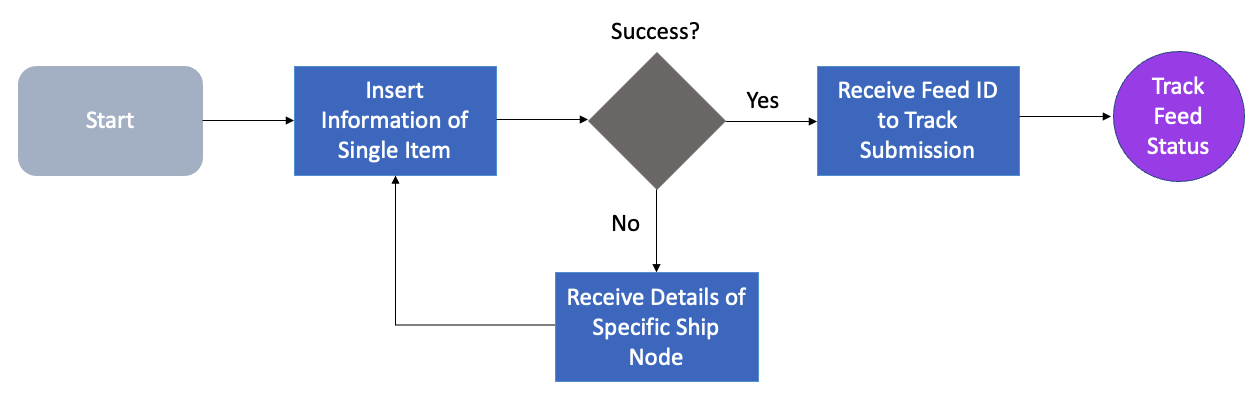
For more about feed statuses and how to track them, see the GET Feed Item Status request.
Query parameters
| Name | Type | Required | Description |
|---|---|---|---|
feedType | string | Yes | Must be lagtime. |
shipNode | string | Yes for v1.0 only | Ship node identifier. Required by v1.0. Not used by v2.x. |
Headers
WM_SEC.ACCESS_TOKEN: <access_token>WM_QOS.CORRELATION_ID: <uuid>Accept: application/json(optional)Content-Type: application/json
multipart/form-datamay be supported for file-based feeds.
Request body (JSON, v2.x)
Feed header plus an array of item updates. v2.x uses GTIN as the primary identifier and supports updating many items across many nodes.
{ "lagtimeFeedHeader": { "version": "2.0.20221010-13_56_27-api", "feedType": "lagtime", "feedDate": "2025-10-31T13:03:33.000Z", "locale": "en", "businessUnit": "WALMART_US" }, "lagtime": [ { "productId": "00097531246801", "shipNode": "123456701", "fulfillmentLagTime": 1 }, { "productId": "00012345678905", "shipNode": "654321098", "fulfillmentLagTime": 2 }, { "productId": "00099887766554", "shipNode": "112233445", "fulfillmentLagTime": 3 } ]
}
cURL example
curl -X POST 'https://api-gateway.walmart.com/v3/feeds?feedType=lagtime' -H 'WM_SEC.ACCESS_TOKEN: <ACCESS_TOKEN>' -H 'WM_QOS.CORRELATION_ID: c488dcf0-33eb-4fdb-a3b9-bce372488d6c' -H 'Accept: application/json' -H 'Content-Type: application/json' -d '{ "lagtimeFeedHeader": { "version": "2.0.20221010-13_56_27-api", "feedType": "lagtime", "feedDate": "2025-10-31T13:03:33.000Z", "locale": "en", "businessUnit": "WALMART_US" }, "lagtime": [ {"productId":"00097531246801","shipNode":"123456701","fulfillmentLagTime":1}, {"productId":"00012345678905","shipNode":"654321098","fulfillmentLagTime":2} ] }'Success response
{ "feedId": "E7BB7DBAF3FF461AB63A2169F3BEAADE@AVQBAgA"
}
Retrieve lag time for a single item
GET /v3/lagtime
Returns the lag time for one item at a single ship node.
Query parameters
| Name | Type | Required | Description |
|---|---|---|---|
sku | string | Conditional | SKU. Required if gtin is not provided. |
gtin | string | Conditional | 14-digit GTIN. Left pad with zeros to 14 digits. Required if sku is not provided. |
shipNode | string | Yes | Ship node identifier. |
Headers
WM_SEC.ACCESS_TOKEN: <access_token>WM_QOS.CORRELATION_ID: <uuid>Accept: application/json(optional)
cURL example (GTIN)
curl -X GET 'https://api-gateway.walmart.com/v3/lagtime?gtin=00012947218283&shipNode=538678001' -H 'WM_SEC.ACCESS_TOKEN: <ACCESS_TOKEN>' -H 'WM_QOS.CORRELATION_ID: c488dcf0-33eb-4fdb-a3b9-bce372488d6c' -H 'Accept: application/json'Success response
{ "sku": "1487132332472", "gtin": "00012947218283", "fulfillmentLagTime": 1
}
Best practices
- Use v2.x with GTIN for all new integrations. v1.0 is deprecated.
- Validate GTINs and left-pad to 14 digits.
- Keep lag time values realistic for your operations. Update when capacity changes.
- For large updates, group items per feed and avoid duplicate submissions.
- Track feeds using the Feeds Status API and retry only when needed.
Data model highlights
- Identifiers: v2.x uses
productId(GTIN-14). v1.0 usessku. - Ship node:
shipNodeidentifies the facility context of the lag time. - Lag time field:
fulfillmentLagTimeis an integer number of days.
Security and privacy
- Use HTTPS for all requests.
- Do not log tokens or PII. Mask sensitive values.
- Rotate credentials on a defined schedule and after any suspected compromise.
Updated 6 months ago