

Item Management API overview
Overview
Use the Item Management API to set up items, fetch product type taxonomy and item specifications, and retrieve item data and feed processing results.
The following flow diagram visualizes the item management process:
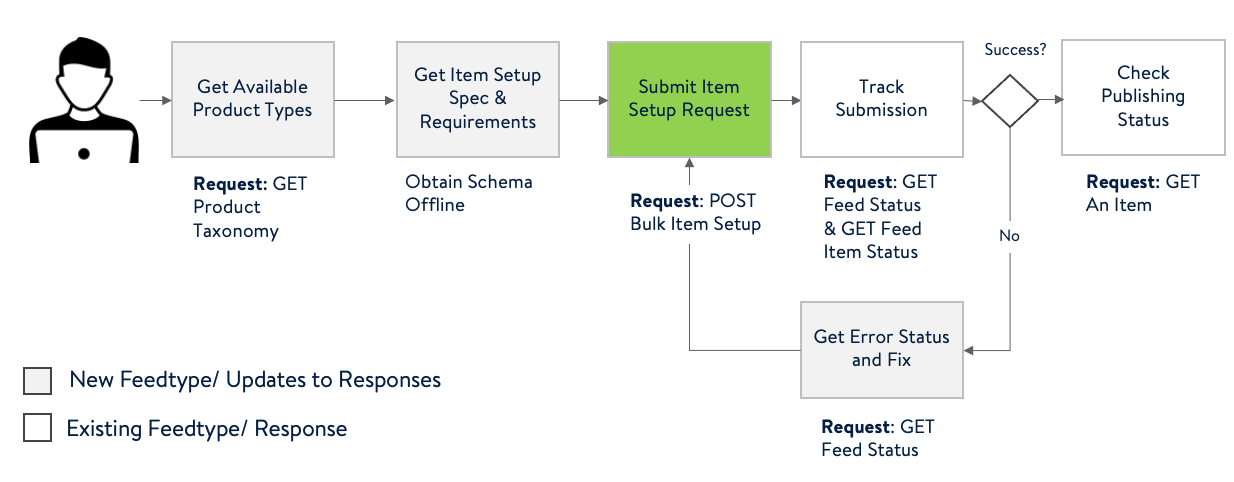
Base URL: https://api-gateway.walmart.com
Audience: Suppliers, drop ship vendors, and internal teams integrating with Walmart Item Management.
How it works
- Retrieve product type taxonomy and field-level specifications
- Submit single-item setup feeds and check feed status
- Browse your item catalog (list & detail views)
Before you begin
- Obtain API credentials and create an access token using the Authentication API.
- Include Walmart headers on every request.
- Use a unique correlation ID per call.
Authentication & headers
Walmart APIs require OAuth-based access tokens.
- Header:
WM_SEC.ACCESS_TOKEN— Required on all endpoints shown here. - Obtain a token using Walmart’s Create access token API using your
clientIdandclientSecret.
Other required headers (varies by endpoint; see each section):
WM_QOS.CORRELATION_ID(Required) — A unique GUID per requestWM_CONSUMER.CHANNEL.TYPE(Optional) — Identifier assigned during onboardingAccept(Optional unless noted) — Typicallyapplication/jsonContent-Type— As required by endpointWM_SVC.NAME(Required for /v3/items/spec) — Usuallysupplier
Always generate a new GUID for
WM_QOS.CORRELATION_ID. Example:b3261d2d-028a-4ef7-8602-633c23200af6
Throttling & rate limits
Endpoints may be rate-limited. If you receive throttling responses, back off and retry according to Walmart guidance.
Error handling
The APIs return structured error bodies. Common HTTP statuses:
- 400 Bad Request — Invalid headers/params/body
- 401 Unauthorized — Invalid/expired token or incorrect auth header
- 404 Not Found / Invalid Parameter — Resource not found for inputs
- 500 Server Error — Internal/validation problems
- 207 Multi-Status (Partial) — For
/v3/items/spec, indicates partial results +errors
Example 400 structure (condensed):
{ "error": [{ "code": "INVALID_REQUEST_HEADER.GMP_GATEWAY_API", "field": "WM_CONSUMER.CHANNEL.TYPE", "description": "WM_CONSUMER.CHANNEL.TYPE set null or invalid.", "info": "One or more request headers are invalid.", "severity": "ERROR", "category": "DATA" }]
}
Conventions & pagination
- Pagination uses
nextCursorwhere provided (preferred). Pass the returnednextCursorin the next call to continue. - Some legacy/limited responses support
offset/limitwhenincludeDetails=true(deprecated for feeds>1,000). PrefernextCursor.
Endpoints
Item Taxonomy — product type hierarchy
GET /v3/items/taxonomy
Returns category → productTypeGroup (PTG) → productType (PT) hierarchy for a specified taxonomy version.
Headers
WM_SEC.ACCESS_TOKEN(Required)WM_QOS.CORRELATION_ID(Required)WM_CONSUMER.CHANNEL.TYPE(Optional)Accept: application/json(Only supported)
Query params
version(Required; enumerated) —5.0.20260608-18_15_07,5.0.20260304-22_45_32,5.0.20260114-19_40_57,5.0.20251118-18_39_44,5.0.20250828-17_32_59,5.0.20250612-15_17_48,5.0.20250121-19_24_23
Response (excerpt)
{ "itemTaxonomy": { "category": "Beauty", "productTypeGroup": [{ "productTypeGroupName": "Fragrances", "productType": [ { "productTypeName": "Body Sprays" } ] }] }, "status": "SUCCESS"
}
cURL
curl -G "https://api-gateway.walmart.com/v3/items/taxonomy" \ -H "WM_SEC.ACCESS_TOKEN: <ACCESS_TOKEN>" \ -H "WM_QOS.CORRELATION_ID: <GUID>" \ --data-urlencode "version=5.0.20250828-17_32_59"Single Item Setup — Submit feed
POST /v3/feeds/items
Submit a single-item setup feed (as JSON or multipart). This API is asynchronous—a 200 response only acknowledges receipt; track processing via the feed status endpoint.
The item bulk submission process takes up to four hours. Item submissions can be subject to a manual review process, which can add up to one week to the submission time. This review process is noted in the feed status response.
After an item is successfully submitted, allow up to six hours for the data to become available.
Headers
WM_SEC.ACCESS_TOKEN(Required)WM_QOS.CORRELATION_ID(Required)WM_CONSUMER.CHANNEL.TYPE(Optional)Accept: application/json | application/xml(Optional)Content-Type: application/json | multipart/form-data(Required)
Query params
feedType(Required):OMNI_DSV_ITEM|OMNI_ONLINE_ITEM|OMNI_OWNED_ITEM
Request (JSON)
{ "file": "27340816" }Request (Multipart)
curl -X POST "https://api-gateway.walmart.com/v3/feeds/items?feedType=OMNI_ONLINE_ITEM" \ -H "WM_SEC.ACCESS_TOKEN: <ACCESS_TOKEN>" \ -H "WM_QOS.CORRELATION_ID: <GUID>" \ -H "Content-Type: multipart/form-data" \ -F "file=@/path/to/item.json;type=application/json"Response (200)
{ "feedId": "2D4DB32BC1174C7491720C9EBEB56163@AQMBAAA" }Feed Status — Single feed full status
GET /v3/feeds/{feedId}
Track ingestion and item-level processing for a submitted feed. Supports nextCursor pagination. Use includeDetails=true to return item-level statuses (when available).
Headers
WM_SEC.ACCESS_TOKEN(Required)WM_QOS.CORRELATION_ID(Required)WM_CONSUMER.CHANNEL.TYPE(Optional)Accept: application/json | application/xml(Optional)
Query params
includeDetails(Optional; defaulttrue)nextCursor(Optional; preferred pagination)offset/limit(Optional; legacy pagination for feeds < 1,000 records)
Response (processed; excerpt)
{ "feedId": "F0B2F67186314531A5D55FE95FDF9179@AVABBgA", "activityId": "0CZ85022", "feedStatus": "PROCESSED", "itemsReceived": 1, "itemsSucceeded": 1, "itemsFailed": 0, "itemDetails": { "itemIngestionStatus": [{ "martId": 0, "wpid": "7837PJ41EFC9", "productIdentifiers": { "productIdentifier": { "productIdType": "GTIN", "productId": "06996489522161" } }, "ingestionStatus": "SUCCESS" }] }
}
Possible feedStatus values
RECEIVED,INPROGRESS,PROCESSED,ERROR
Possible item ingestionStatus values
SUCCESS,INPROGRESS,IN_REVIEW,DATA_ERROR,SYSTEM_ERROR,TIMEOUT_ERROR
cURL
curl -G "https://api-gateway.walmart.com/v3/feeds/<FEED_ID>" \ -H "WM_SEC.ACCESS_TOKEN: <ACCESS_TOKEN>" \ -H "WM_QOS.CORRELATION_ID: <GUID>" \ --data-urlencode "includeDetails=true"Catalog — Retrieve all items
GET /v3/items
List items in your catalog. Use nextCursor to page through results. You can filter by sku or publishedStatus.
Headers
WM_SEC.ACCESS_TOKEN(Required)WM_QOS.CORRELATION_ID(Required)WM_CONSUMER.CHANNEL.TYPE(Optional)Accept: application/json | application/xml(Optional)
Query params
nextCursor(Optional; preferred pagination)sku(Optional)publishedStatus(Optional):PUBLISHED|UNPUBLISHED|INPROGRESS
Response (excerpt)
{ "itemResponse": [{ "mart": "WALMART_US", "sku": "WEJSELIUR1556", "wpid": "0TSMMC1ZF383", "upc": "405531683348", "gtin": "00405531683348", "productName": "Coca Cola Big Candy Bar Chocolate Yum", "price": { "currency": "USD", "amount": 12.75 }, "publishedStatus": "PUBLISHED", "lifecycleStatus": "ACTIVE" }], "totalItems": 1981, "nextCursor": "610c8690-916e-401c-9c51-9f11cd5e8776"
}
cURL
curl -G "https://api-gateway.walmart.com/v3/items" \ -H "WM_SEC.ACCESS_TOKEN: <ACCESS_TOKEN>" \ -H "WM_QOS.CORRELATION_ID: <GUID>" \ --data-urlencode "publishedStatus=PUBLISHED"Catalog — Retrieve a single item with full details (v4)
GET /v4/items/{productId}
Get one item by GTIN-14 (default), or pass productIdType to use SKU, UPC, EAN, etc. Optional includeFullItemDetails=YES returns additional sections such as walmartOrderableAttributes, itemConfigurations, and more.
Headers
WM_SEC.ACCESS_TOKEN(Required)WM_QOS.CORRELATION_ID(Required)WM_CONSUMER.CHANNEL.TYPE(Optional)Accept: application/json(Supported)
Query params
productIdType(Optional; defaultGTIN):EAN|GTIN|ISBN|ITEM_ID|SKU|UPC|WINincludeFullItemDetails(Optional;YES|NO, defaultNO)
Examples
# Default GTIN-14
curl "https://api-gateway.walmart.com/v4/items/00012345678905" \ -H "WM_SEC.ACCESS_TOKEN: <ACCESS_TOKEN>" \ -H "WM_QOS.CORRELATION_ID: <GUID>" # SKU with additional details
curl "https://api-gateway.walmart.com/v4/items/XYZ12348?productIdType=SKU&includeFullItemDetails=YES" \ -H "WM_SEC.ACCESS_TOKEN: <ACCESS_TOKEN>" \ -H "WM_QOS.CORRELATION_ID: <GUID>"
Response (excerpt)
{ "itemResponse": { "gtin": "00012345678905", "sku": "RG-IRAE-79VD", "productName": "Wrangler Boy's Gamer Cargo Shorts", "brand": "Nike", "mainImageUrl": "https://m.media-walmart.com/images/I/51FoC6Pg3OL.jpg", "publishedStatus": "PUBLISHED", "price": { "amount": 24.99, "currency": "USD" }, "siteDates": { "siteStartDate": "2025-11-14T15:11:33.19Z", "siteEndDate": "2049-03-24T00:00:00Z" } }
}
Field & content tips
- Core visible fields:
productName,brand,shortDescription,keyFeatures[],mainImageUrl,color,gender,condition,smallPartsWarnings[], dimensions/weight (assembled),netContent. - Media: Provide square 1:1 images (recommend 2200×2200, 300ppi) and .jpg URLs that resolve publicly without redirects.
- Warranty: If
has_written_warrantyisYes - Warranty URL, thenwarrantyURLis required; ifYes - Warranty Text, thenwarrantyTextis required. - California Prop 65: If
isProp65WarningRequiredis"Yes", provideprop65WarningText. - Hazmat: If
chemicalAerosolPesticide = Yesor battery types are lithium/lead acid, include SDS, battery sections, hasBatteries, batterySize, and numberOfHazardousComponents as applicable. - Variants: Provide
variantGroupId,variantAttributeNames[],isPrimaryVariant, optionalswatchImages[]for visual variant attributes.
Always validate against the
/v3/items/specschema for your feedType + version + productTypes before submission.
Status reference
| Domain | Field | Values |
|---|---|---|
| Feed | feedStatus | RECEIVED, INPROGRESS, PROCESSED, ERROR |
| Item Ingestion | ingestionStatus | SUCCESS, INPROGRESS, IN_REVIEW, DATA_ERROR, SYSTEM_ERROR, TIMEOUT_ERROR |
| Item Publishing | publishedStatus | PUBLISHED, UNPUBLISHED, INPROGRESS |
Glossary
- GTIN — Global Trade Item Number (often GTIN-14)
- UPC — 12-digit barcode used in US retail (GTIN-12)
- EAN — 13-digit European Article Number (GTIN-13)
- SKU — Stock Keeping Unit (partner-defined)
- WPID — Walmart Product Identifier (Walmart-generated)
- PT — Product Type | PTG — Product Type Group
Support
- For ingestion or system errors that persist after retries, contact Walmart Partner Support via the appropriate portal.
- Share
feedId,activityId(when available), andWM_QOS.CORRELATION_IDfor faster troubleshooting.
Updated 24 days ago