

Electronic Data Interchange (EDI) interface
Drop-ship vendors can use Electronic Data Interchange (EDI) to transfer data to and from Walmart.com. Walmart provides specifications and examples for using the EDI interface.
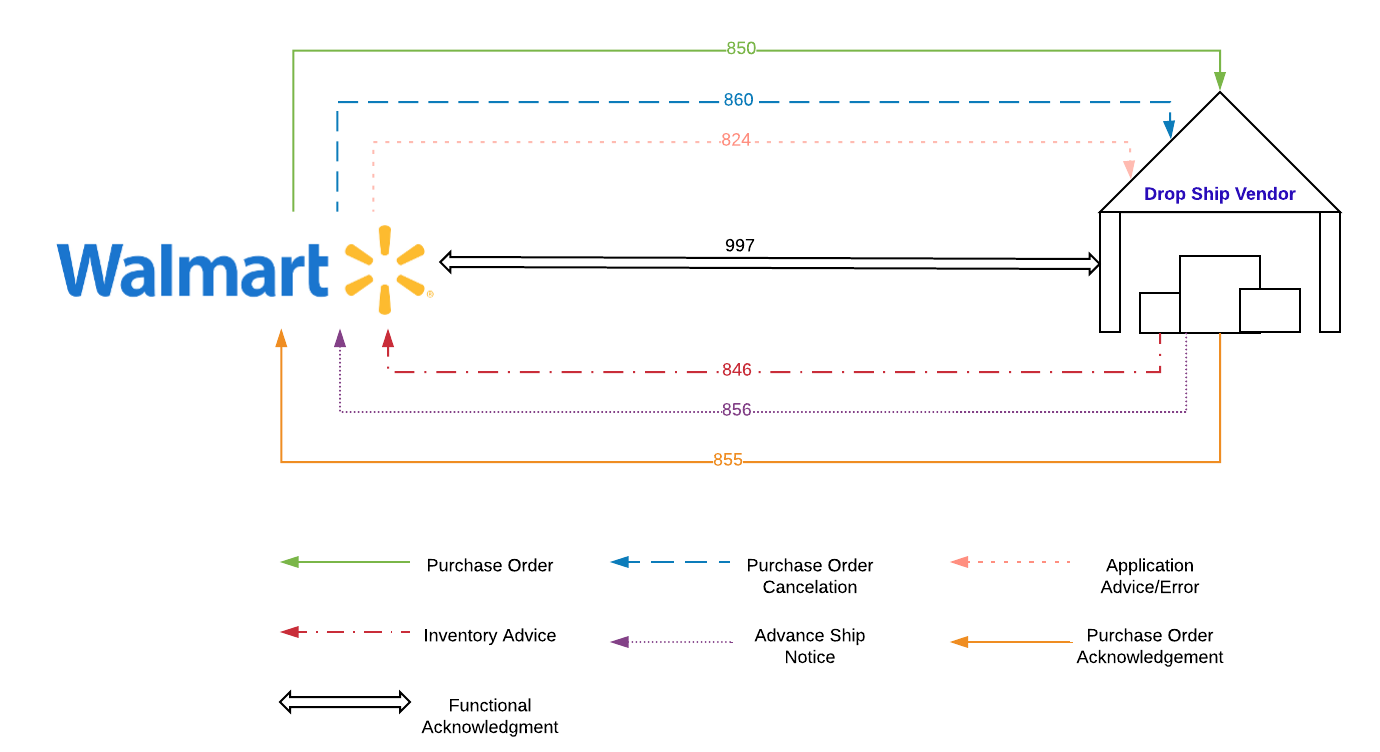
The following diagram visualizes how each of the standards in this section contributes to the EDI workflow.
EDI File Naming Conventions
If you use EDI in production over SFTP, you must note the file naming convention Walmart will expect.
Note: For other connectivity, such as through AS2 or solution providers, the naming convention is not required.
Files to Walmart.com:
- WMI_855PR_VVVVVVVVV_YYYYMMDD_HHMMSS_NNNNNN.edi
- WMI_856SH_VVVVVVVVV_YYYYMMDD_HHMMSS_NNNNNN.edi
- WMI_846IB_WWWWWWWWW_YYYYMMDD_HHMMSS_NNNNNN.edi
- WMI_997FA_VVVVVVVVV_YYYYMMDD_HHMMSS_NNNNNN.edi
Files from Walmart.com:
- WMI_850PO_VVVVVVVVV_YYYYMMDD_HHMMSS_NNNNNN.edi
- WMI_860PC_VVVVVVVVV_YYYYMMDD_HHMMSS_NNNNNN.edi
- WMI_997FA_VVVVVVVVV_YYYYMMDD_HHMMSS_NNNNNN.edi
Where:
- VVVVVVVVV is the DSV ID assigned by Walmart.com
- WWWWWWWWW is the DSV ID/DSV Facility ID assigned by Walmart.com
- YYYYMMDD is an eight-digit file creation date (GMT date)
- HHMMSS is a six-digit file creation time (24-hour GMT)
- NNNNNN is a six-digit random number.
EDI Delimiters
All the EDI files should use the following defined delimiters:
- Segment: ~
- Element: *
- Field: >
Example (partial EDI 850 snippet):
ISA*00* *00* *01*12345678 *01*987654321
*180328*0027*U*00401*004360436*0*P*>~GS*PO*12345678*018978783*20180328*002737*1420623*X*004010~ST*850*0001~BEG*00*DS*9876769779896**20180328~
Updated 6 months ago
Did this page help you?