

DSV Order Management API overview
Use the DSV Order Management API to acknowledge drop-ship vendor orders, ship or cancel order lines, retrieve orders, and bulk-download order data.
You can manage orders with the DSV customer order flow. When a customer places an online order with Walmart, the system creates a sales order which is used to generate one or more purchase orders. The purchase order is then assigned to a DSV supplier to fulfill directly to the customer.
Order object
A Walmart order object represents a purchase order and consists of a group of one or more line items. Every individually unique item has a line number. This is only applicable for DSV customer orders.
Note: The order has no inherent status, but the line items do. Extract the Order Management XML schema definitions (XSDs) at the following link: OrderManagement.zip
Purchase order statuses
Purchase order line item status
DSV purchases orders do not have a status assigned to them at the purchase order level. All statuses are individually assigned at the purchase order line level.
The valid statuses for a DSV purchase order line item are:
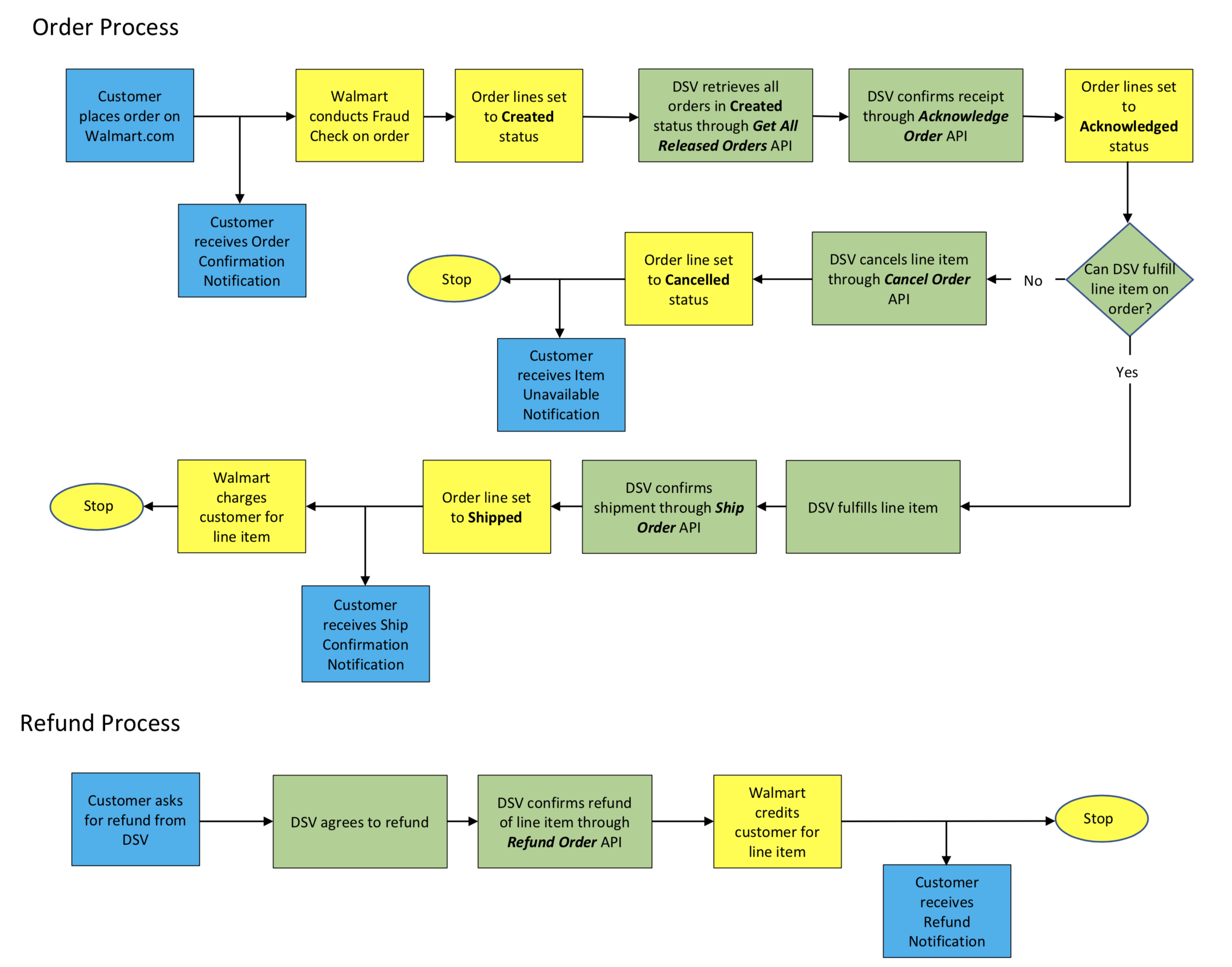
Created: The purchase order for the line items are created and have been released from the Walmart Order Management System (OMS) to DSVs for processing. The order must be acknowledged before shipping.Acknowledged: The line item content has been acknowledged by the assigned DSV.Shipped: The items of that line of the purchase order have been shipped.Cancelled: The line item has been cancelled. DSVs cannot fulfill the purchase order.
DSV purchase order charge types
The valid DSV purchase order charge types are:
PRODUCT: The product charges for the specified line item in purchase order.SHIPPING: The shipping charges for the specified purchase order line item. Walmart only supports Coordinated Universal Time (UTC)shipDateTime.
DSV order workflow
To successfully fulfill or refund orders, follow this order management workflow:
Base URLs
- Production:
https://api-gateway.walmart.com - Sandbox:
https://sandbox.walmartapis.com
Key concepts
- Purchase Order (PO): Identified by
purchaseOrderId. - Order Line: Each item line within a PO (
lineNumber). - Ship Node: Your facility ID (
shipNode) used across endpoints. - Order Statuses:
Created,Acknowledged,Shipped,Delivered,Cancelled,Refund. - Date Ranges: Retrieval endpoints are limited to the last 180 days.
- Result Limits:
limit≤ 200 per page; up to 20,000 orders per download call where noted.
How it works
- Acknowledge new orders (status
Created) promptly, preferably within four hours. - Ship order lines with tracking as soon as they leave your facility. For Site to Store (S2S), include ASNs.
- Cancel order lines before fulfillment if necessary and update inventory.
- Retrieve orders (all, released, or by PO) as needed.
- Bulk download DSV Orders via the Reports API for large data pulls.
Before you begin
- Obtain API credentials and create an access token using the Authentication API.
- Include Walmart headers on every request.
- Use a unique correlation ID per call.
Authentication & headers
Use the Authentication Management API to obtain WM_SEC.ACCESS_TOKEN. Send the token in the header for each call. Refresh when tokens expire.
All requests must be authenticated with an OAuth access token and include a correlation ID for traceability.
| Header | Required | Description | Example |
|---|---|---|---|
WM_SEC.ACCESS_TOKEN | Yes | OAuth access token returned by the Authentication API. | eyJraWQiOi... |
WM_QOS.CORRELATION_ID | Yes | Unique GUID per call for tracing. | 16338294-795c-44eb-97cd-37967f8532e5 |
WM_CONSUMER.CHANNEL.TYPE | No | Onboarding-provided channel identifier. | 0f3e4dd4-0514-4346-b39d-… |
Accept | No | Response media type. | application/json or application/xml |
Content-Type | When body is present | Request body media type. | application/json or application/xml |
Tips
- Generate a new
WM_QOS.CORRELATION_IDfor each request. - Encode special characters in query values (e.g.,
: / ? # [ ] @ ! $ & ' ( ) * + , ; = { } %) and spaces as%20where noted.
Endpoints
Acknowledge orders
Acknowledge an order (all lines) so it’s committed for fulfillment.
Method & URL
POST /v3/orders/{purchaseOrderId}/acknowledge
Path & Query
| Name | In | Required | Notes |
|---|---|---|---|
purchaseOrderId | path | Yes | PO identifier. |
shipNode | query | Yes | Your facility ID. |
Headers: See Authentication & Required Headers.
Request body: None
Success response (200): Returns the order object with current line statuses and details.
cURL
curl -X POST "https://api-gateway.walmart.com/v3/orders/2581154514813/acknowledge?shipNode=123456701" \ -H "WM_SEC.ACCESS_TOKEN: $TOKEN" \ -H "WM_QOS.CORRELATION_ID: $(uuidgen)" \ -H "Accept: application/json"Best practices
- Only orders in
Createdshould be acknowledged. Orders inAcknowledgedmay be re‑acknowledged when resolving prior errors. - Do not re‑acknowledge if any line is
ShippedorCancelled.
Ship one or more purchase order lines
Mark one or more PO lines as Shipped and provide tracking. For S2S, include package/pallet ASN.
Method & URL
POST /v3/orders/{purchaseOrderId}/shipping
Path & Query
| Name | In | Required | Notes |
|---|---|---|---|
purchaseOrderId | path | Yes | PO identifier. |
shipNode | query | Yes | Your facility ID. |
Headers: See Authentication & Required Headers.
Request body (JSON)
{ "orderShipment": { "orderLines": { "orderLine": [ { "lineNumber": "1", "orderLineStatuses": { "orderLineStatus": [ { "status": "Shipped", "asn": { "packageASN": "1061414119283746", "palletASN": "10614141192837465" }, "statusQuantity": { "unitOfMeasurement": "EACH", "amount": "1" }, "trackingInfo": { "shipDateTime": "2025-10-31T13:03:33.000Z", "carrierName": { "carrier": "USPS" }, "methodCode": "Standard", "trackingNumber": "9400111202555777777777", "trackingUrl": "https://tools.usps.com/go/TrackConfirmAction" } } ] } } ] } }
}
Carrier & method enums
- Carriers:
UPS,USPS,FedEx,Airborne,OnTrac,DHL,LS,UDS,UPSMI,FDX,FEDEXSP - Method codes:
Standard,Express,OneDay,Freight,WhiteGlove,Value
Success response (200): Returns the updated order with shipped line(s).
cURL
curl -X POST "https://api-gateway.walmart.com/v3/orders/2581154514813/shipping?shipNode=123456701" \ -H "WM_SEC.ACCESS_TOKEN: $TOKEN" \ -H "WM_QOS.CORRELATION_ID: $(uuidgen)" \ -H "Content-Type: application/json" \ -H "Accept: application/json" \ -d @shipment.jsonBest practices
shipDateTimemust be UTC (ISO 8601).- Changing a line to
Shippedcharges the customer; acknowledge before shipping to avoid underselling. - After a line is
Shipped, it cannot be updated. - If using
carrierName.otherCarrier, you must also providetrackingUrl.
Cancel order lines
Cancel one or more order lines before fulfillment and update inventory accordingly.
Method & URL
POST /v3/orders/{purchaseOrderId}/cancel
Path & Query
| Name | In | Required | Notes |
|---|---|---|---|
purchaseOrderId | path | Yes | PO identifier. |
shipNode | query | Yes | Your facility ID. |
Headers: See Authentication & Required Headers.
Request body (JSON)
{ "orderCancellation": { "orderLines": { "orderLine": [ { "lineNumber": "1", "orderLineStatuses": { "orderLineStatus": [ { "status": "Cancelled", "cancellationReason": "SUPPLIER_CANCEL_BACKORDER", "statusQuantity": { "unitOfMeasurement": "EACH", "amount": "1" } } ] } } ] } }
}
Supported reasons
SUPPLIER_CANCEL, SUPPLIER_CANCEL_CUSTOMER_REQUEST, SUPPLIER_CANCEL_BACKORDER, SUPPLIER_CANCEL_DISCONTINUE, SUPPLIER_CANCEL_UNRECOGNIZED
Success response (200): Returns the order with canceled line(s).
cURL
curl -X POST "https://api-gateway.walmart.com/v3/orders/2581154514813/cancel?shipNode=123456701" \ -H "WM_SEC.ACCESS_TOKEN: $TOKEN" \ -H "WM_QOS.CORRELATION_ID: $(uuidgen)" \ -H "Content-Type: application/json" \ -H "Accept: application/json" \ -d @cancel.jsonRetrieve all orders
Fetch orders using filters. Returns a paginated list and a nextCursor for page-through when needed.
Method & URL
GET /v3/orders
Query parameters
| Name | Required | Notes |
|---|---|---|
shipNode | Yes | Your facility ID. |
limit | No | Max 200 per page. |
sku | No | URL‑encode special chars and spaces as %20. |
customerOrderId | No | |
purchaseOrderId | No | |
status | No | One of Created, Acknowledged, Shipped, Delivered, Cancelled. |
createdStartDate / createdEndDate | No | ISO 8601. Window limited to last 180 days. |
fromExpectedShipDate / toExpectedShipDate | No | ISO 8601. |
productInfo | No | true/false to include image URL & weight (if available). |
Pagination
- Use the
meta.nextCursorvalue to request the next page. - The API can return up to 20,000 orders per download session; requests above that return an error.
cURL
curl -G "https://api-gateway.walmart.com/v3/orders" \ -H "WM_SEC.ACCESS_TOKEN: $TOKEN" \ -H "WM_QOS.CORRELATION_ID: $(uuidgen)" \ -H "Accept: application/json" \ --data-urlencode "shipNode=123456701" \ --data-urlencode "status=Created" \ --data-urlencode "limit=100"Retrieve a single order
Get full detail for a specific PO.
Method & URL
GET /v3/orders/{purchaseOrderId}
Path & query
| Name | In | Required | Notes |
|---|---|---|---|
purchaseOrderId | path | Yes | PO identifier. |
shipNode | query | Yes | Your facility ID. |
productInfo | query | No | true/false to include image URL & weight (if available). |
cURL
curl "https://api-gateway.walmart.com/v3/orders/2581154514813?shipNode=123456701&productInfo=false" \ -H "WM_SEC.ACCESS_TOKEN: $TOKEN" \ -H "WM_QOS.CORRELATION_ID: $(uuidgen)" \ -H "Accept: application/json"Retrieve all released orders
Get all orders with at least one line in Created status (released from OMS and ready to fulfill).
Method & URL
GET /v3/orders/released
Query parameters: Same as Retrieve all orders. limit ≤ 200; last 180 days; up to 20,000 orders per pull.
cURL
curl -G "https://api-gateway.walmart.com/v3/orders/released" \ -H "WM_SEC.ACCESS_TOKEN: $TOKEN" \ -H "WM_QOS.CORRELATION_ID: $(uuidgen)" \ -H "Accept: application/json" \ --data-urlencode "shipNode=123456701" \ --data-urlencode "limit=100"Bulk Download (Reports)
Use the Reports API to download all DSV Orders in bulk.
Create a report request
Method & URL
POST /v3/reports/reportRequests?reportType=DSV_ORDERS&reportVersion=v1
Body (optional filters)
{ "rowFilters": [ { "type": "enumFilter", "columnName": "SUPPLY ITEM STATUS CODE", "values": ["A", "D"] } ]
}
Response (200)
{ "requestId": "4406b7c3-674e-41e4-a18a-5fd6f123479f", "requestStatus": "RECEIVED", "requestSubmissionDate": "2025-10-31T13:03:33.000Z", "reportType": "DSV_ORDERS", "reportVersion": "v1"
}
cURL
curl -X POST "https://api-gateway.walmart.com/v3/reports/reportRequests?reportType=DSV_ORDERS&reportVersion=v1" \ -H "WM_SEC.ACCESS_TOKEN: $TOKEN" \ -H "WM_QOS.CORRELATION_ID: $(uuidgen)" \ -H "Content-Type: application/json" \ -H "Accept: application/json" \ -d @report-filters.jsonCheck report status
Method & URL
GET /v3/reports/reportRequests/{requestId}?reportType=DSV_ORDERS&reportVersion=v1
Statuses
RECEIVED→INPROGRESS→READY(orERROR)
cURL
curl "https://api-gateway.walmart.com/v3/reports/reportRequests/4406b7c3-674e-41e4-a18a-5fd6f123479f?reportType=DSV_ORDERS&reportVersion=v1" \ -H "WM_SEC.ACCESS_TOKEN: $TOKEN" \ -H "WM_QOS.CORRELATION_ID: $(uuidgen)" \ -H "Accept: application/json"Get the download URL
Method & URL
GET /v3/reports/downloadReport?requestId={requestId}
When status is READY, response includes a time‑bound downloadURL and downloadURLExpirationTime.
Example (READY)
{ "requestId": "2ae33c9d-fdf7-40e3-1230-9a73fec09adb", "requestStatus": "READY", "reportType": "DSV_ORDERS", "reportVersion": "v1", "reportGenerationDate": "2025-10-31T13:03:33.000Z", "downloadURL": "https://marketplace.walmartapis.com/v3/reports/getReport/...zip?...", "downloadURLExpirationTime": "2025-10-31T13:03:33.000Z"
}
cURL
curl "https://api-gateway.walmart.com/v3/reports/downloadReport?requestId=2ae33c9d-fdf7-40e3-1230-9a73fec09adb" \ -H "WM_SEC.ACCESS_TOKEN: $TOKEN" \ -H "WM_QOS.CORRELATION_ID: $(uuidgen)" \ -H "Accept: application/json"Appendix: Data model notes & enums
- Unit of Measurement:
EACH,EA - Order Status (line):
Created,Acknowledged,Shipped,Delivered,Cancelled,Refund - Shipping Method:
Standard,Express,OneDay,Freight,WhiteGlove,Value - Carriers:
UPS,USPS,FedEx,Airborne,OnTrac,DHL,LS,UDS,UPSMI,FDX,FEDEXSP - Refund Reasons (subset):
BillingError,TaxExemptCustomer,ItemNotAsAdvertised,IncorrectItemReceived,CancelledYetShipped,ItemNotReceivedByCustomer,IncorrectShippingPrice,DamagedItem,DefectiveItem,CustomerChangedMind,CustomerReceivedItemLate,Missing Parts / Instructions,Buyer canceled,Customer returned item,General adjustment,Merchandise not received,Quality -> Missing Parts / Instructions,Shipping & Delivery -> Damaged,Shipping & Delivery -> Shipping Price Discrepancy,Finance -> Goodwill,Finance -> Rollback,Others
Identifiers
purchaseOrderId: stringsku: DSV‑defined alphanumeric; URL‑encode special characters.gtin: 14‑digit GTIN; pad with leading zeros if shorter.
Date-times
- All timestamps are ISO 8601. For shipping,
shipDateTimemust be UTC.
Troubleshooting
- 401/403: Verify
WM_SEC.ACCESS_TOKENis valid and not expired. - 400: Check request body shape, enums, and that
statusQuantity.amountis"1"where required. - 409: Attempt to ship a line that is already
ShippedorCancelled. - Pagination gaps: Always follow
meta.nextCursoruntil exhausted. - Large pulls: Keep
limit≤200; ensure total pulled orders ≤20,000per operation.
Updated 4 months ago