

Order management API overview
Use the Walmart Marketplace Orders Management API to manage and process orders for items sold on Walmart.com. As a Walmart seller or approved Solution Provider, you can:
- Retrieve order lists and individual order details.
- Update order statuses, including shipping, cancellations, and refunds.
- Track the lifecycle of each order from creation through fulfillment.
Note: For Canada and Mexico markets, you can ship multiple items in a single shipment. You can also ship one item in multiple packages each with its own label. For Walmart generated labels, you must now generate labels separately using the Create Label API.
How it works
Overall seller journey
In a common user journey, a seller or approved Solution Provider might complete the following flow:
- Item Setup: Create or register products (SKUs) with Walmart using the Item Management API.
- Order Management: Retrieve and confirm orders, shipments, and cancellations through the Orders Management API.
- Inventory Management: Keep SKU quantities accurate using the Inventory API.
- Pricing: Adjust item prices through Pricing APIs.
Orders Management flow
Within Order Management, refer to the following for a common user flow:
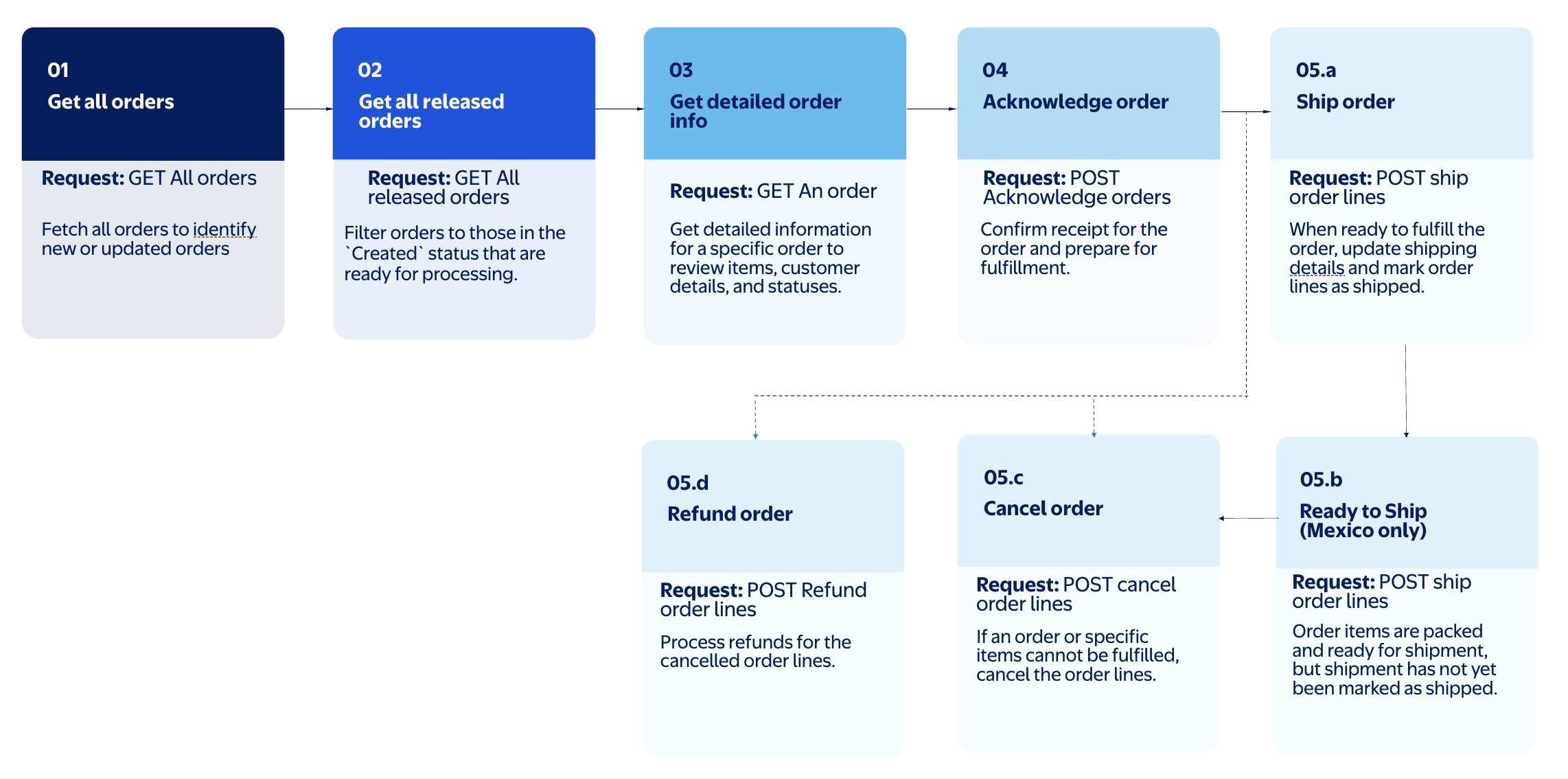
Order lifecycle and status
Every order on Walmart Marketplace progresses through the following statuses:
- Created – A new order has been placed and is ready to be acknowledged.
- Acknowledged – You've confirmed receipt and plan to fulfill the order.
- Shipped – You've marked the order as shipped and submitted the tracking information.
- Ready to ship Market availability: MX only - Order items are expected and ready for shipment, but shipment has not yet been marked as shipped.
- Canceled – You've canceled an order line.
- Delivered – You delivered the order. Purchase order lines that are delivered to customers have
status=Delivered.
Reference guide
This guide explains how to use the Marketplace Orders Management API, providing practical examples and step-by-step instructions for integrating order management into your solution.
For full technical details, including endpoints, parameters, and brief descriptions, refer to the Marketplace Orders API reference guide.
Prerequisites
Complete the following before you start integrating the Orders Management API:
- Complete the steps in the Getting started guide:
- If you are a seller, refer to the Get started as a seller.
- If you are an approved Solution Providers, refer to the Get started as an approved Solution Provider.
- OAuth 2.0 authentication Market availability: US only - Required to access the Walmart Marketplace APIs. Ensure you have obtained the credentials and tokens before making API requests. For more information, refer to OAuth 2.0 authorization.
- Delegated access authorization Market availability: CA | CL | MX - Use delegated access authorization to create separate API Keys and credentials for each approved Solution Provider. For more information, refer to Delegated access authorization.
- Ensure your account is set up to receive and process orders in the Walmart Marketplace Seller Center.
Commonly used terms
| Terms | Description |
|---|---|
| Order Line | An individual item or group of items within an order. Each order line includes details such as quantity, pricing, status, and fulfillment information. |
| Purchase order ID | A unique identifier assigned by Walmart for each order. This ID is used to reference and manage orders. |
| Fulfillment option | The method of fulfillment, such as seller-fulfilled or Walmart Fulfillment Services (WFS). |
| SKU (Stock keeping unit) | A unique identifier for an item. |
Charge types
Each order line includes charge details that define the amount billed to the customer. Walmart supports the following charge types:
| Charge Type | Description |
|---|---|
| PRODUCT | The product cost for the order line. |
| SHIPPING | The shipping cost for that order line. Must include shipDateTime in UTC. |
Market availability
The Walmart Orders Management API is available for sellers listing on Walmart marketplaces in Canada, Chile, Mexico, and the U.S.
Next steps
Decide which Orders Management APIs to integrate.
Download order schemas and decide which Marketplace Orders Management APIs to integrate.
Updated 5 months ago